

Heads up: some links in this post are affiliate links, which means HenkTek may earn a commission if you buy through one. It costs you nothing extra and it does not change what we recommend.
Picture a Monday in a Fort Myers office where three people share two desks. Someone drops their MacBook down, plugs in, and nothing lines up the way it should. One monitor wakes up. The other stays black. The wired network never connects, and now they’re ten minutes into the day wrestling a nest of cables instead of answering email.
That’s the exact mess a good USB-C dock clears up, and the UGREEN Revodok Pro 209 is the one I would hand a client setting up hot desks right now. It’s a 9-in-1 dock running about $130 at the moment, down from a $170 list price. One cable to the laptop and the desk handles the rest. Here’s how it held up and where it trips.
What you actually plug into it
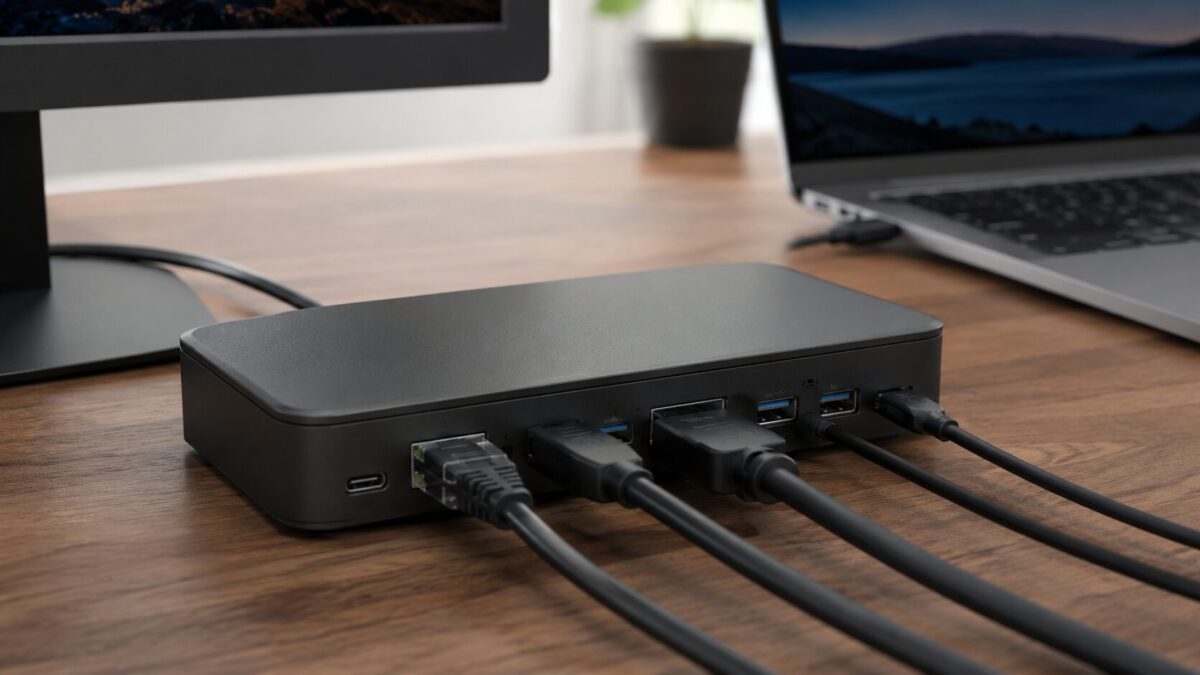
The back panel covers most of what a small office desk needs. You get two HDMI outputs and two DisplayPort outputs, all rated for 4K at 60Hz. There’s a USB-C power line that sends up to 100W back to the laptop, though in real use it charges most machines closer to 85W, which is plenty for a MacBook Air or a mid range business laptop.
Then the everyday stuff. Gigabit ethernet for a wired connection that beats the flaky office Wi-Fi most rentals come with. Two USB-A ports and one extra USB-C port for data, all running at 10Gbps, so pulling a big file off a thumb drive takes a few seconds. The whole thing is small, about the length of a pen case, so it hides under a monitor stand without eating desk space.
Two monitors on a MacBook, for real
Here’s the reason to pick this dock over a cheaper one. Apple’s M1, M2 and M3 laptops normally cap out at a single external display. Plug two monitors into a basic dock and the second one just sits there dark. The Revodok Pro 209 uses DisplayLink, which routes video over USB and gets around that limit, so a MacBook Air can finally drive two screens at once.
For a hot desk that different people share through the week, that matters. A Windows laptop and a MacBook can sit at the same station and both get the dual monitor setup, no swapping gear. You do have to install a small DisplayLink driver the first time, and I’ll get to why that’s a mild annoyance in a second.
The catches worth knowing
No dock is perfect and this one has a couple of quirks you should hear before you buy a dozen of them. First, the DisplayLink driver. It’s a quick install, maybe five minutes, but it is a step, and on a locked down work laptop you might need an admin to approve it.
Second, those four video ports don’t all fire at once. You pick two. The manual lists which pairs work together, like two HDMI, two DisplayPort, or one of each, and that’s your two display maximum. Nobody’s running four monitors off this.
Last thing. DisplayLink compresses the video signal, so this isn’t the dock for a graphic designer color grading photos or anyone gaming on the side. For spreadsheets, browser tabs, Zoom calls and the normal office workload, you’d never notice. For 4K video editing, look elsewhere.
Who it’s a good fit for
If you’re running a hybrid team, a clinic front desk, or any Fort Myers office where people rotate through shared desks, this is an easy call. It turns a bare desk into a full workstation with one plug, and $130 is fair for what you get. The dual monitor trick on MacBooks alone saves the hassle of buying pricier gear.
Skip it if the desk belongs to a video editor or a gamer. Everyone else, it does the job and gets out of the way.
Setting up hot desks in your Fort Myers office
The dock is the easy part. Getting the wired network, the display settings, and the security right across ten or fifteen machines is where a shared desk rollout gets fiddly, especially if half the team is on Mac and half on Windows. That’s the part we handle.
HenkTek sets up and supports IT for small businesses across Fort Myers, Cape Coral, Bonita Springs and the rest of Southwest Florida. If you’re planning a hybrid office or fighting a desk full of cables, reach out for a free consultation and we’ll get it sorted.
More desk and kit picks: the IT technician tools list is the gear and licences we hand working techs, and the small business IT equipment page covers the office side.
If the desks you are kitting out do not have a machine yet, a dock like this pairs neatly with one of the mini PCs we use on office desks. The box hides behind the monitor, the dock takes the single cable to the desk, and swapping either one out later does not disturb the other.
Before you buy
How many monitors can the Revodok Pro 209 drive?
It has dual HDMI out. Check your laptops own display limit first though, some base MacBook chips only drive one external screen no matter what dock you use.
Does it charge the laptop too?
Yes, pass through charging runs over the same USB-C cable that carries video and data. One cable on the desk.
Is it a good hot desk dock?
That’s where it fits best. Everything stays plugged into the dock and whoever sits down connects one cable.

HenkTek is a local IT company in Fort Myers that looks after the technology Southwest Florida businesses depend on, from Cape Coral and Bonita Springs to Naples. We handle managed IT, cybersecurity, backups and help desk support, and we explain things in plain English.