IT Technician Tools
The Kit and Licences Worth Paying For
Most tool lists for techs are written by people who don’t turn a screwdriver. This is the short version of what earns its place in a bag or a van, plus the two software licences that pay for themselves the first time you use them. Some links are affiliate links and we may earn a commission, at no extra cost to you.
Tools that pay for themselves
There’s a line every tech crosses at some point where buying the proper licence stops being an expense and starts being the cheapest thing on the invoice. A single billable data recovery job covers a technician licence for the year. One imaging deployment across a dozen machines covers the other one.
That’s the filter for this page. Not the cheapest option, and not the one with the longest feature list. The stuff that either saves you hours on a job you already have booked, or lets you bill for work you otherwise have to turn away.
Fair warning on the software. Read the licence terms before you buy, because the difference between a single machine licence and a technician licence is the difference between using it legally on client hardware and not. The consumer versions of most of these tools aren’t licensed for billable work.
Six things worth carrying
Two licences and four physical tools.

EaseUS Data Recovery Wizard Technician
The technician tier is licensed for unlimited machines and for billable client work, which the Pro version isn’t. If you pull data off failed drives at all, this is the line item on the page that most obviously pays for itself.

AOMEI Backupper Technician Plus
Unlimited PCs and servers inside one company, image deploy over the network, PXE boot, and a portable build you can run off a USB stick without installing. Perpetual licence, no subscription.
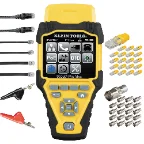
Klein Scout Pro Max
The one that does length, distance to fault and PoE verification, where the cheaper testers only tell you the wires are in the right order. If you certify runs or chase bad drops in old buildings, the jump from a basic tester is worth it.
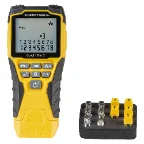
Klein Scout Pro 3 kit
The everyday tester. Location remotes let you map a whole patch panel on your own, which is the difference between a one person job and a two person job.
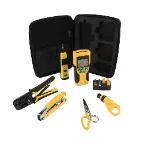
Klein VDV001819 install set
Crimper, stripper, punch down and tester in one case. If you’re still borrowing a punch down tool from somebody, start here instead of buying pieces one at a time.
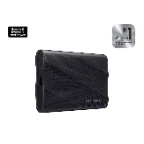
Samsung T9 2TB
Fast enough to pull a full image off a client machine while you’re still on site. Two terabytes covers a couple of jobs before you have to clear it down. Keep it encrypted, you’re carrying client data on it.
Read the terms before you buy
This catches people out constantly. Consumer and Pro tiers of most recovery and imaging software are licensed for your own machines. The moment you run them on a client device and put it on an invoice you’re outside the terms. Technician tiers cost more up front and then stop being a problem.
The other thing worth checking is whether a licence is per seat, per company or perpetual. AOMEI sells theirs as a one time purchase covering unlimited machines within a single company, which works well if you’re a one or two person shop. That model gets awkward if you subcontract. Check it against how you actually work before you spend the money.
If you’re working alongside somebody’s internal IT person (not replacing them), our co-managed IT page covers how that usually gets split up.
Three more depending on your work
AOMEI Backupper Technician
The step below Technician Plus. Covers unlimited PCs but not servers, so it’s the cheaper pick if your work is all workstations and no server rooms.
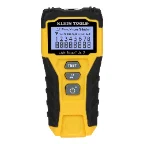
Klein LAN Scout Jr. 2
Pocket continuity tester for when you just need to know whether a cable is dead. Cheap enough to keep a spare in the truck.
Samsung T9 1TB
Same drive, half the capacity, noticeably cheaper. Fine as a dedicated imaging drive if you clear it after every job.
If you’re building a kit from nothing
Testing first
You can’t charge for guessing. A tester turns a vague network complaint into a specific bad drop, and that’s the difference between an hour and an afternoon.
Then a fast drive
Imaging before you touch anything is the habit that keeps a bad day from turning into a claim. A slow drive means you skip that step when you’re rushed.
Imaging licence next
Once you’re doing more than a couple of rebuilds a month, deploying an image beats installing Windows by hand every time.
Recovery licence when the calls come
Buy it the first time somebody hands you a dead drive and asks what you can do. Not before, because it’s the most expensive item here.
Other lists and services
Speccing gear for an office, not a bag? The small business IT equipment list covers gateways, switching, NAS and power. For security and backup software there’s recommended cybersecurity tools. Our own service pages cover business computer repair, data backup and recovery, remote support and the IT help desk.
If you’re a tech in Southwest Florida with more work than hours, we do take overflow and subcontract work. There’s more about how we operate on about us.
Common questions
Are these affiliate links?
Some of them, yes. We may earn a commission if you buy through a link on this page. The price you pay is the same. Nothing is on this list because of what it pays.
Do you use every tool listed here?
No, and we aren’t going to claim we do. These are picks based on specs, licence terms and the kind of jobs they suit. Treat it as a shortlist to check against your own work, not a test report.
What’s the difference between the pro and technician versions?
Licensing, mostly. Pro tiers cover your own machines. Technician tiers cover unlimited client machines and allow billable use. The feature gap matters less than the legal one.
Is a technician licence worth it for a part time repair business?
Depends how often you say no to work. If you turn away data recovery jobs because you don’t have the tool, one job covers the licence. If you get one a year, it doesn’t.
Why Klein over the cheaper testers?
Because the cheap ones tell you the pinout is right and nothing else. Distance to fault is the feature you end up paying for, and it’s what turns a bad drop into a spot on the wall instead of a whole afternoon.
Do you sell any of this directly?
No. We don’t resell hardware or licences. Buy it wherever you like, these links just happen to be where we would send someone.
Do you take subcontract work from other techs?
Sometimes, for business clients in the Fort Myers area. Give us a call and we can talk about whether it fits.
More work than hours?
We take overflow and co-managed work for business clients around Fort Myers. Give us a call and we will tell you straight whether we can help.