Small Business IT Equipment
What We Recommend and Why
Clients ask us what to buy almost as often as they ask us to fix something. This is the short list we point them at for a small office network, sorted the way you would actually install it. Some links here are affiliate links, so we may earn a commission if you buy through them. It costs you nothing extra and it doesn’t change what goes on this list.
Buy once, not twice
Most of the emergency calls we take on office networks trace back to hardware somebody bought on price alone. A $60 router handling 18 people. A backup drive sitting on the same power strip as the server it backs up. Consumer gear does fine at home and then falls over the moment you put a business on it.
So this page is the answer we give over the phone, written down. Everything here is equipment we would spec for a small office in Fort Myers, chosen because it holds up and because you can still get parts and firmware for it in three years. Where a cheaper option makes sense we say so.
One thing worth being upfront about. The UniFi networking gear and the Synology units are what we deploy for clients, so those come from real installs and we know how they behave in a working office. Everything else here is a recommendation based on specs, the track record of the product line, and the kind of failures we get called out to fix. We haven’t lab tested every unit on this page and we aren’t going to pretend otherwise.
Six pieces that cover a small office
Install them roughly in this order. Each one assumes the last.
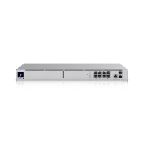
UniFi Dream Machine SE
Gateway, firewall, controller and NVR in one 1U box. This is what we put in when we replace an aging office network. It gives you real logging and a VPN you can actually manage.
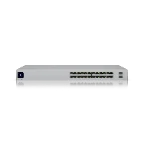
UniFi Pro 24 PoE switch
The switch we pair with the gateway above. Twenty four ports with PoE so your phones, cameras and access points all run off one cable each. Managed, so you can segment guest traffic away from the machines that hold patient or client records.
Amazon stock on this one comes and goes and is often third-party sellers. If the listing shows no Buy Box, Ubiquiti sells it direct at store.ui.com.
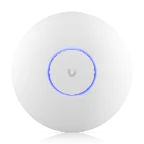
UniFi U7 pro access point
The access point we mount in client offices. Ceiling mounted Wi-Fi 7 with a 10G uplink, and one of these covers most small suites. Two covers a bigger floor plan with treatment rooms or offices along a hallway.
Amazon stock on this one comes and goes and is often third-party sellers. If the listing shows no Buy Box, Ubiquiti sells it direct at store.ui.com.
Synology DS925+ (4-bay)
The on-site backup target and file share we install. Four bays gives you room to run redundancy and still have usable space. Pair it with cloud backup, because a NAS in the same building as the server is not a disaster recovery plan.

Seagate IronWolf Pro 12TB
NAS rated drives for the Synology above. Buy them in pairs or fours. Desktop drives will work right up until they don’t, and they are not built for the constant spin a NAS puts on them.
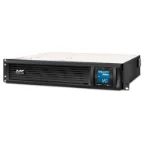
APC Smart-UPS 1500VA
Rackmount battery backup for the closet. It is not about riding out a long outage, it is about giving the server and the NAS a clean shutdown when the power blinks. Which in Southwest Florida is often.
Backup is the piece that saves you
Every item above protects against a different failure. The firewall stops what comes in from outside. The UPS handles the power. But the only thing that gets you back after ransomware or a drowned server is a backup you have actually tested, and that is where most small offices are thinnest. A NAS on its own is a single point of failure sitting in the same room as everything else.
What we set up looks like this. Image backups running to the local NAS so a dead workstation is a two hour rebuild instead of two days. A second copy going off site so a fire or a theft doesn’t take both. And a restore tested on a schedule, because an untested backup is a guess. We cover the software side of that on our backup and security software page, and the service side under backup and recovery.
Three more worth budgeting for
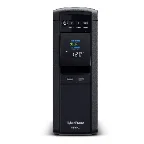
CyberPower CP1500PFCLCD
A desk side UPS for the front desk machine and anywhere else a hard shutdown corrupts a database. Cheaper than the rack unit and does the job for one PC.
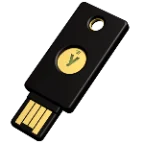
YubiKey 5 NFC
Hardware MFA for the accounts that would hurt most if they were taken. Email, banking, the practice management login. Phishing gets past training. It doesn’t get past a physical key.
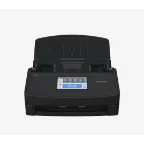
Ricoh ScanSnap iX1600
If you’re still keeping paper charts or paper invoices, this is the machine that ends that. Duplex, wireless, and fast enough that staff will actually use it instead of stacking things next to it.
Speccing an office, step by step
Count the drops, not the people
Switch sizing comes from cable drops. Workstations, printers, cameras, access points, the phone on the front desk. Count them, then add a quarter for growth.
Walk the floor for Wi-Fi
Access point count depends on walls, not square feet. Older buildings around Fort Myers have block and plaster that will eat a signal one room over.
Size backup to your data, then double it
Take what you’re storing now, double it, and buy drives for that. Running a NAS near full is how you end up buying the whole thing again in eighteen months.
Put the closet on battery last
Once you know what lives in the rack you know the load. Size the UPS to shut things down cleanly, not to keep the office running through a storm.
If you would rather not do it yourself
Buying the right box is the easy half. Configuring it so the guest network can’t reach your records, the backups verify, and someone gets an alert when a drive dies is the half that takes time. We handle that for offices around Fort Myers, Cape Coral and Naples under managed IT services, with cybersecurity and wireless networking handled as part of it. For one off projects there’s IT consulting, and if something is already broken, business computer repair.
Dental and medical offices have extra rules about where records live and who can reach them. We cover that on the dental IT and medical IT pages. Technicians looking for their own kit should head to our technician tools list instead.
Common questions
Do you make money if I buy through these links?
Yes. Some links on this page are affiliate links, and we may earn a small commission if you buy through them. You pay the same price either way. Nothing gets added to this list because it pays more, and we have left off plenty of gear that pays well.
Have you tested all of this equipment?
Not all of it. The UniFi networking gear and the Synology NAS units are what we deploy for clients, so those come from real installs. The rest is a recommendation based on specs, product line track record and the failures we get called out to fix.
Can I just buy this and have you install it?
Yes, that’s common. Buy the hardware yourself and we will configure and install it at our normal hourly rate (current pricing is on the rates page). Or we can quote the whole project including the gear.
Is UniFi overkill for a five person office?
Sometimes. For a very small suite the Cloud Gateway Ultra and a single access point will do fine and saves a few hundred dollars. The Dream Machine SE earns its money once you have a server, cameras or more than about a dozen users.
Why a NAS instead of just cloud backup?
Speed. Restoring a full workstation image over a cable connection takes most of a day. Off a local NAS it’s a couple of hours. You want both, with the NAS handling day to day restores and the cloud copy there for the bad week.
Do you work with home offices or residential clients?
No. HenkTek is business only. We don’t take residential work, and we don’t service phones, tablets or game consoles.
How current are the recommendations?
We review this page as models get replaced. Prices move daily on Amazon so we don’t list them here, check the current price at the link.
Not sure what your office needs?
Tell us how many people you have and what is failing. We will tell you what to buy, whether or not we install it.