

Somewhere in Fort Myers right now there’s a law office running client Zoom calls off a $40 webcam balanced on top of a TV. The sound comes out of the TV speakers, half the room never makes it into frame, and the person at the far end of the table may as well be a rumor. If that sounds like your conference room, this Logitech MeetUp 2 review is for you.
Quick note on method before we start. We have not torn one of these apart in the shop. Everything below comes from Logitech’s full datasheet, the live Amazon listing, and what the spec sheet does and doesn’t promise. Where the fine print contradicts the marketing, we point it out.
Affiliate note: the Amazon links in this post are affiliate links. If you buy through one, HenkTek earns a small commission at no extra cost to you.
What the MeetUp 2 actually is
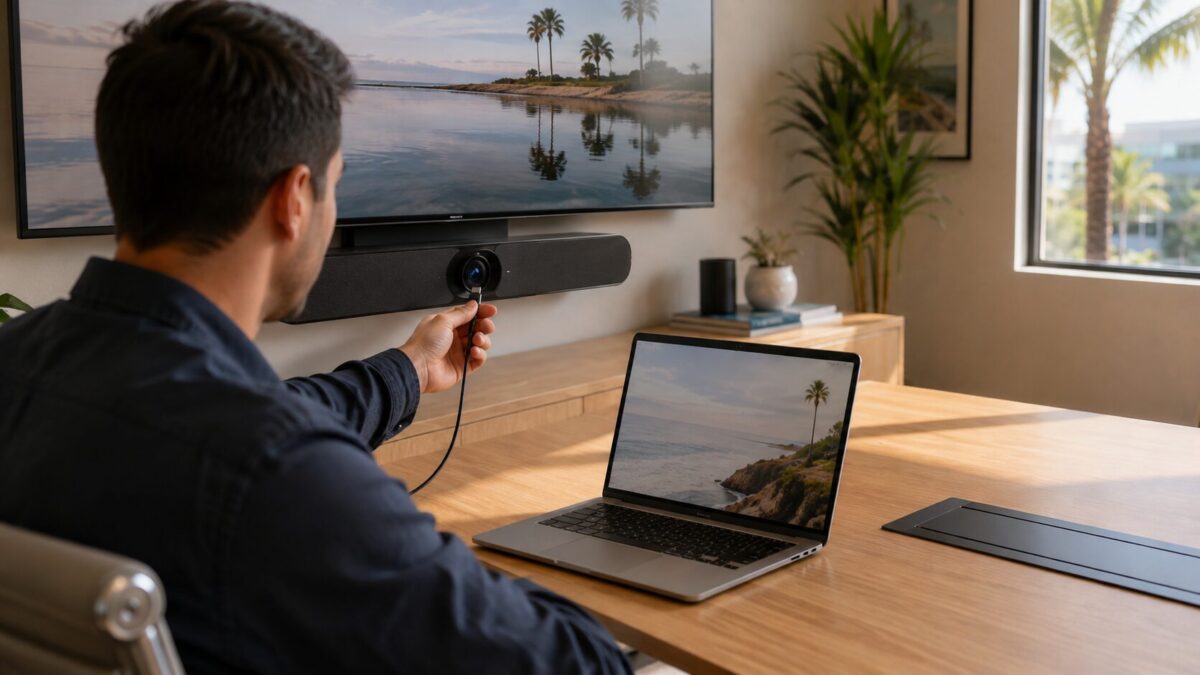
It’s an all in one video bar built for small meeting rooms. One 18.5 inch unit that sits under your TV and replaces the webcam, the speakerphone puck and the pile of adapters nobody can ever find the right one from. Inside the bar you get a 4K camera with a 120 degree diagonal field of view and 4x digital zoom, six beamforming mics that Logitech rates for voice pickup out to 23 feet, and a 55mm speaker with an 8 watt amp. It runs Logitech’s CollabOS software and plays nice with Microsoft Teams, Zoom and Google Meet, so your office doesn’t have to change platforms.
The price stings a little: $899 on Amazon as of this writing. A decent webcam costs a hundred bucks. But the webcam doesn’t fix your audio, and audio is the thing clients on the other end complain about first. This replaces three or four separate devices and the mess of cables between them.
Setup: two cables or one
Out of the box it’s a two cable arrangement for laptop meetings. USB-C from the bar to the laptop, HDMI from the laptop to the TV. Logitech includes a 9.8 foot USB-C cable, a power supply, and a multi mount that handles wall, table or display mounting with one bracket. There’s a threaded insert for tripods too, and a manual privacy shutter over the camera, which the security minded folks in the room will appreciate.
The single cable trick, where one USB-C line carries your video call and the TV picture at the same time, needs Logitech’s Active USB Cable. That one supports DisplayPort Alt Mode, runs 16.4 feet, and is sold separately through Logitech resellers. Worth asking about when you order, because one cable on the table beats two every single time someone new walks into the room.
It also has an Ethernet port and WiFi, which sounds boring until you realize that’s what lets an IT provider watch the room remotely through Logitech Sync, push firmware updates, and know the room is down before your 9am does.
The AI features that earn their keep
RightSight 2 is the camera brain. Group View frames everybody in the room automatically. Speaker View crops in on whoever is talking while keeping a small view of the whole room. And Camera Zone lets you draw a boundary for what the camera should care about, so people walking past your glass wall stop photobombing the call. Half the professional offices in Southwest Florida have a glass fronted conference room, that feature alone will sell it for some of them.
On the audio side, RightSound 2 levels out loud and quiet talkers at different distances from the bar, runs AI noise suppression against keyboard clatter and AC hum, and applies echo suppression for rooms with hard surfaces. If your conference room has a tile floor and a wall of windows like most around here do, echo is the problem you’ve been living with. This is the part of the hardware most likely to make remote clients notice a difference.
Logitech MeetUp 2 review: what the spec sheet warns you about
A few things the marketing pages don’t lead with. First, the camera captures 4K but the datasheet lists display output at 1080p. In practice that matters less than it sounds, every meeting platform compresses video anyway, but if you expected 4K passthrough to that new TV, no.
Second, there is no appliance mode. The MeetUp 2 always needs a computer attached, either a laptop somebody brings in or a small PC that lives in the room. Logitech’s Rally Bar Huddle is the sibling product that runs meetings without one. If you’d rather have a dedicated room computer, a compact desktop works well here, we covered some good options in our mini PC roundup.
Third, that 23 foot mic range means huddle rooms and small conference rooms, call it 6 to 8 people. If you’re outfitting a training room for twenty, this is the wrong product and no amount of AI will save it.
Full specs are in Logitech’s datasheet if you want the fine print. It also carries a 2 year hardware warranty, which at this price it had better.
Want it installed and working in your Fort Myers office?
HenkTek sets up meeting rooms for businesses across Fort Myers, Cape Coral, Bonita Springs and Naples. We mount the bar, run the cabling so it doesn’t look like spaghetti, configure Teams or Zoom for your team, and hook up remote management so problems get fixed before your meeting starts. If your conference room still runs on a webcam and hope, reach out for a free consultation or call (239) 234-2334.
Outfitting the rest of the office? Our small business IT equipment picks run through the network gear worth buying.
Common questions
What room size fits the Logitech MeetUp 2?
Small rooms. The 120 degree field of view covers a huddle table fine, but past about six seats you are shopping the Rally line instead.
Does the MeetUp 2 work without a computer?
It connects over USB, so plan on a laptop or a small room PC driving the call.
MeetUp 2 or Rally Bar Huddle?
Both target small rooms. The MeetUp 2 is the simpler USB bar you plug a laptop into. The Rally Bar Huddle costs more and can run room software on its own, which matters for a dedicated Teams or Zoom room.
HenkTek is a local IT company in Fort Myers that looks after the technology Southwest Florida businesses depend on, from Cape Coral and Bonita Springs to Naples. We handle managed IT, cybersecurity, backups and help desk support, and we explain things in plain English.